TypeScript at 10:30pm (Part 1)
September 1, 2017dev frontend accessibility conferences
If you are like me, you are a rare breed of developer. The developer who works strictly in the UI space, by UI, I mean user interface, NOT interactivity. This didn’t happen on purpose, this was purely accidental (ask me later).
The first thing that comes to mind when I think of user interactivityis JavaScript. All forms and flavors of JavaScript from Angular to TypeScript. Yes, the smorgasbord of usable and useless libraries and frameworks is overwhelming, but hey, let’s give TypeScript a try shall we?
Meh…TypeScript?
So TypeScript, superset of JavaScript if I am correct, and very scalable. Sounds cool, so let’s give it a shot. Open up your terminal and start with installing TypeScript.
First
If you want to write TypeScript locally, first you should install it with npm.
npm install -g typescript
Second
Create a new directory where you want to play around with TS and navigate in to that directory.
mkdir typescript-fun && cd typescript-fun
Third
Create a new file with a .ts extension.
touch app.ts
Compile
tsc app.ts
Type Annotations
TypeScript has a thing called “type annotations”. Basically, without the jargon, you can declare the specific type of variable you are instantiating. We have a few different types in JavaScript; number, string, bool, array, object, and believe it or not, a function. Below I demonstrate how to declare types on variables in TypeScript.
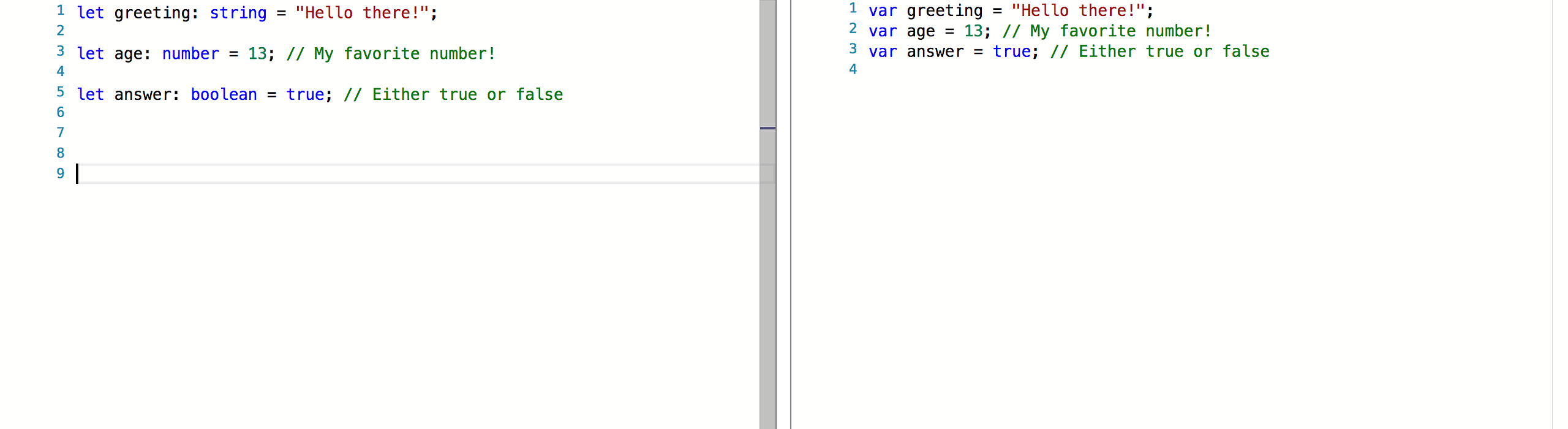
Declaring types with variables in TypeScript.
However, if you choose to contradict the strict types you will get errors like below. To be clear, these are errors in TypeScript, BUT they are completely valid in JavaScript…so I have been told.
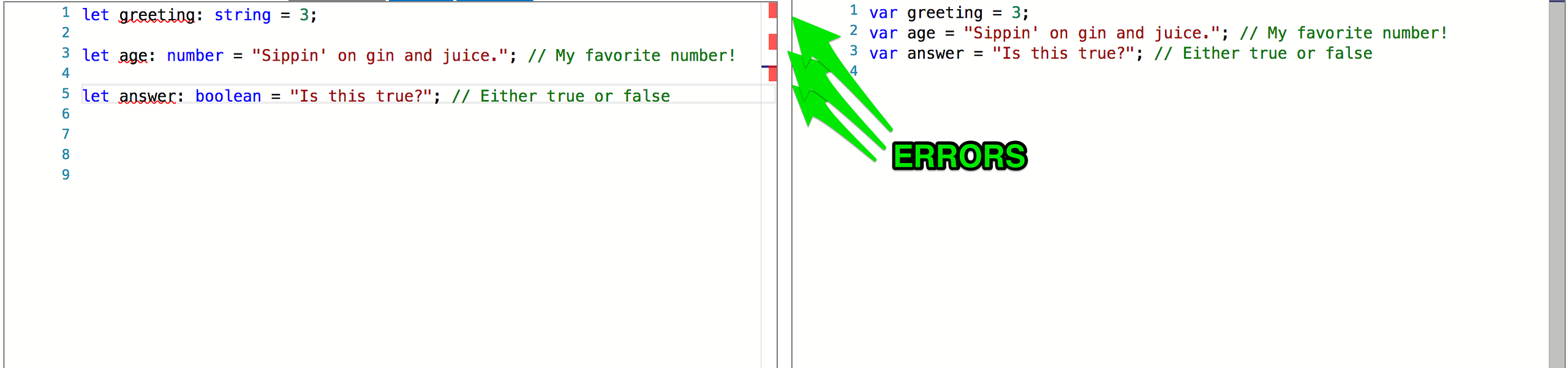
Errors in TypeScript BUT valid in JavaScript.
The Why?
Well, I can’t tell you the why. Why do you ask? I am not a JavaScript developer, nor am I a TypeScript developer, but my buddy David Pine summarized the why for me.
So basically the benefit of TypeScript is that it will help developers write more scalable JS. The static typing allows the IDE to show developers that perhaps they are not following the intent of the code, as there are conflicts with the types.
Conclusion
Well, that’s it for now. This post served as a basic introduction into what I now know about TypeScript and what I am currently learning. Next up in this series, I will look at something else cool about TypeScript, just not sure exactly what yet, stay tuned ;